Most planning problems are found too late. A team commits to a goal that quietly depends on another team's capacity. Two business units chase the same customer with different targets. A Key Result turns out to measure activity rather than progress. None of this is visible in a spreadsheet during planning week. It shows up six weeks into the cycle, when changing course is slow and expensive.
The Drafting Module in Workpath is built for the weeks before a cycle starts. It is where teams turn priorities into Goals and Key Results, and where the program lead can see the whole set take shape: what is clear, what is vague, and where teams depend on or contradict each other.
Why drafting in spreadsheets costs more than it seems
When goals are drafted in Excel, slides and workshop boards, three things tend to happen.
Quality depends on the team. Experienced teams write measurable, outcome-focused goals. Others write task lists. The program lead only finds out when reviewing dozens of files one by one.
Dependencies stay hidden. Each team drafts in its own file, so nobody sees that two goals overlap, conflict or rely on the same people until the cycle is already running.
The program lead becomes the bottleneck. Reviewing, commenting and chasing revisions across every team eats the time that should go into the conversations with leadership about trade-offs.
The cost shows up in delivery. Workpath's research on 30,200 team goals from 3,600 teams in 54 companies found that more than half of all goals do not make it above 70% progress, and 9% fail completely. Goals for which teams do not share ownership have a 53% higher relative rate of failing completely.¹
What good drafting settles
Good drafting is not about nicer wording. As the original version of this article put it, the point is the conversation in the team about what success in the coming cycle really means. By the end of drafting, each team should be able to answer four questions:
- What outcome are we after? A change for customers or the business, not a list of activities.
- How will we know? Key Results with a baseline and a target, ideally tied to a KPI the team can influence.
- Who else is involved? The teams we contribute to, depend on, or might be duplicating.
- What are we not doing? The priorities we are leaving out, so capacity goes where it matters.
When these answers exist before the cycle starts, leadership can decide on trade-offs while there is still room to make them.
How the Drafting Module supports this
One workspace for the whole set
The Drafting Module is a full-screen workspace for drafting all Goals and Key Results of a Team, Business Unit or the whole organization for a chosen cycle. Several people can draft together in the same session, every change saves automatically, and drafting tips in the sidebar switch between Goal and Key Result guidance depending on what you are working on. Instead of collecting files, the program lead works in one place with everyone else.
Draft with AI
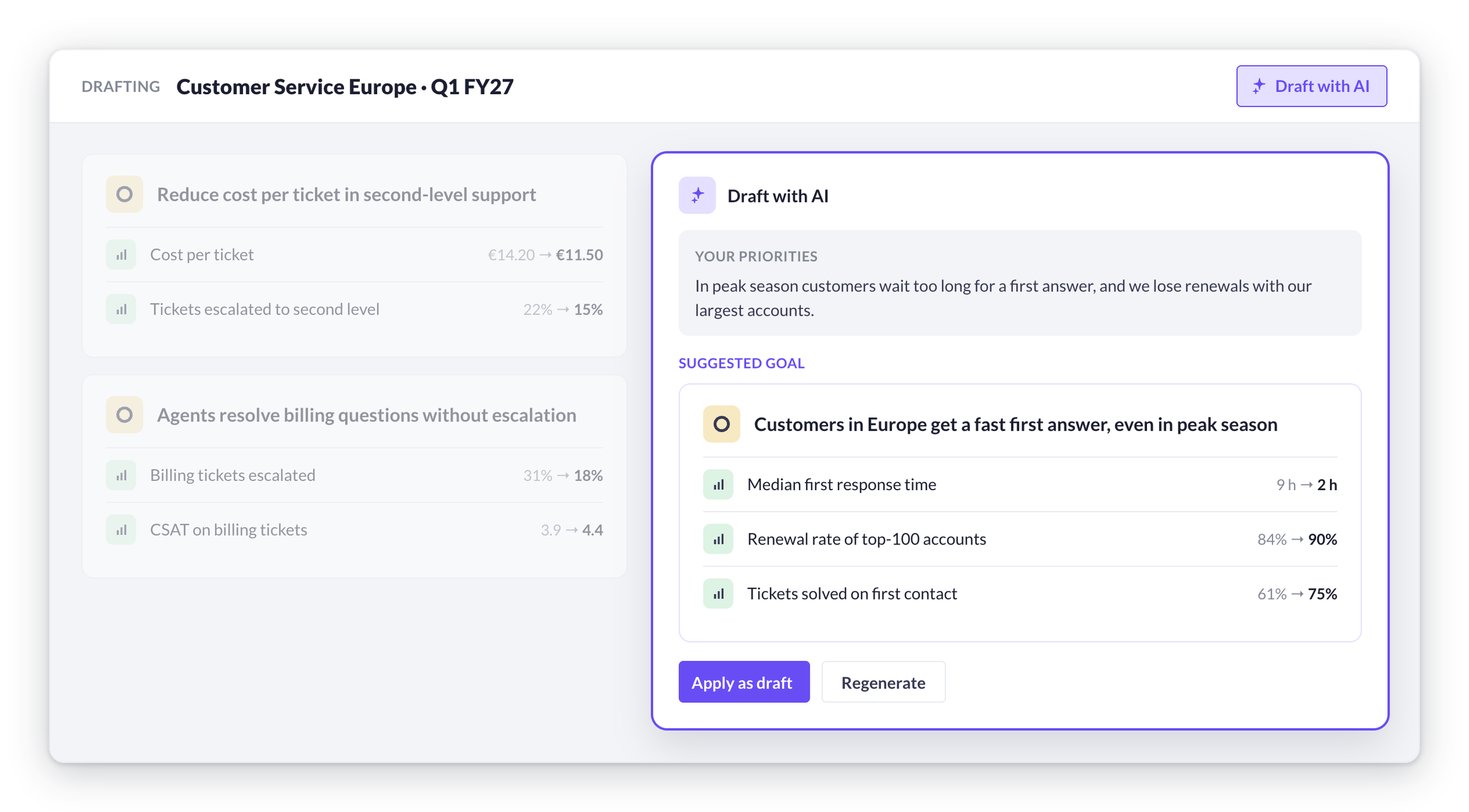
Teams that struggle to get started can click "Draft with AI", describe their priorities or challenges in their own words, and get a suggested outcome-oriented Goal with measurable Key Results, including start and target values. The suggestion appears next to the draft, so the team can regenerate it or apply it as a starting point and edit from there.
AI quality checker
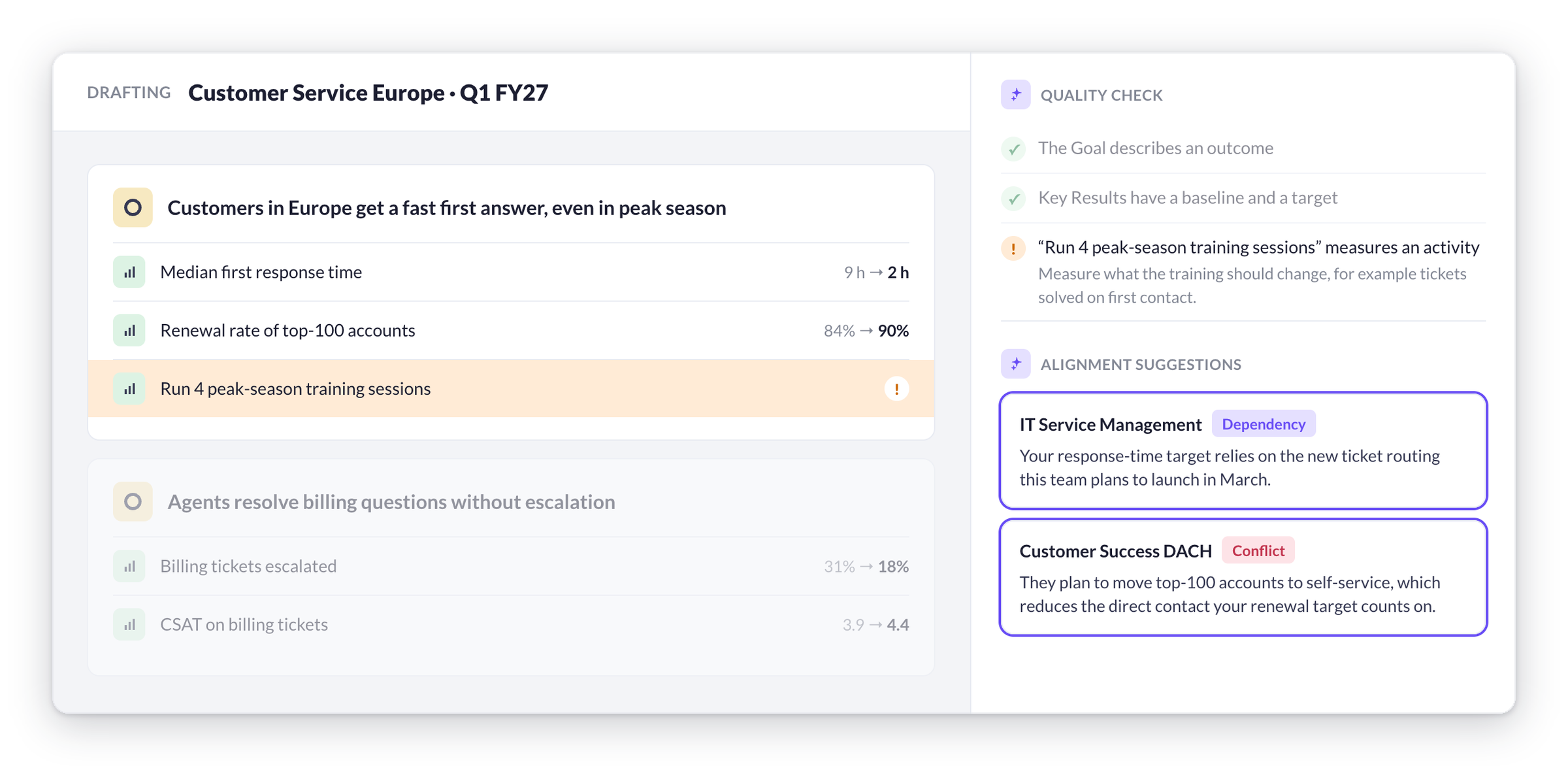
While a team drafts, the AI quality checker rates each Goal and Key Result against quality criteria and returns pass or warning feedback with guidance. Vague wording and missing metrics are flagged before anything is published, so the program lead no longer has to catch them by hand.
AI alignment suggestions
This is where most of the late surprises disappear. While a Goal is being drafted, Workpath suggests other Teams whose work relates to it and classifies the relationship, for example a contribution, a dependency, a conflict or a duplicate, with a short explanation of why it matters. The suggestions update as the Goal changes, so overlaps and conflicts surface during planning instead of in the middle of the cycle.
A drafting coach in the AI Companion
Teams can also draft in a conversation. The AI Companion coaches them step by step through their Goals and Key Results, grounded in the team's existing Goals and its off-track KPIs. It asks for a real baseline and target, offers the team's actual KPI values as candidates, runs a quality check, suggests alignments and saves the draft when the team is happy. The same coach is available in Microsoft Teams.
The AI features are switched on per organization. Talk to us about which of them fit your setup.
What changes for program leads
- Fewer review loops. Quality checks happen while teams draft, so reviews focus on substance rather than wording.
- Conflicts found in planning. Dependencies and duplicates are visible before the cycle starts, when they are cheap to resolve.
- One view for leadership. The whole set of Goals is in one place, so trade-off discussions start from the same picture.
- Consistent quality without more coaching hours. Every team gets the same guidance, whether or not a coach is in the room.
The behaviours that drafting builds matter: in the same research, goals where all examined planning behaviours were followed performed up to 30% better than goals where none were used.¹
Further reading
If you are preparing your next planning cycle, the article Operating Rhythm: What It Actually Requires covers how planning, reviews and decisions fit together across the year.
If you would like to see the Drafting Module with your own planning cycle in mind, we are happy to walk you through it.

¹ Workpath, Quantitative Evidence on the Behaviors of High-Performing OKR Teams (2023), based on anonymized data from 30,200 team goals, 3,600 teams and 54 companies. The figures show correlation, not proven cause.